Showing posts with label Digital Art Examples. Show all posts

Wednesday, October 5, 2016

What Have I Been Up To?


     Well the title says it all. What have I been up to? It has been about a month since my last post. Blogs are hard to keep up with and when you get busy, it gets hard to keep up with the blog. Anyways, that is no excuse. I have been working on my art. I have a couple of commissions that need to stay private until done and received. I also completed a new painting recently.

Best Friends
     This is the latest painting. I call it "Best Friends" as it seems that the two horses are sharing a friendly moment. The painting is actually based on a public domain photo off a copyright free website called Pixabay. I actually love this site for reference photos. It is a huge source of inspiration and worry free since the photos are free of copyrights.
Here is a link to the website for those that are interested, https://www.pixabay.com/.

     The actual painting was done on my ipad as usual in my favorite app, Procreate. I love the rough texture that I used to create the background and then added a canvas overlay in the end to complete the feel of the painting. I believe that it gives an old style oil painting feel.

     If you are interested in purchasing this painting as a print or on products you can go to my website,
http://beckysdigitalart.com/featured/best-friends-becky-herrera.html. I also have it up on Society6 here, https://society6.com/product/best-friends6341_print#s6-5748971p4a1v45. Society6 has a few more options for print products and they sometime have free shipping so it is worthwhile to check them out.

     I have also completed another long term project. This one took me simply forever, but I think the finished product looks awesome. Here is the Peacock Zentangle Inspired Art. This one is also up for sale on my website, here http://beckysdigitalart.com/featured/peacock-zia-becky-herrera.html and on Society6 here, https://society6.com/product/peacock-zia-pxt_print#s6-8016433p4a1v45


Peacock Zentangle Inspired Art


     Another project that I finished is my third installment of my favorite dog breeds series. Here is the English Bulldog painting all done. I like adding the breed name border. I think it gives a kind of harmony to the series and makes it collectable. If you are a bulldog lover, you can find prints of this painting on my website here, http://beckysdigitalart.com/featured/english-bulldog-with-border-becky-herrera.html and on Society6 here, https://society6.com/product/english-bulldog-with-border-qz2_print#s6-4797220p4a1v45. Note that I also have the same painting available without the border and name across the bottom.
English Bulldog


     I have actually been working on more Zentangle art as well and cant wait to show the final product. It will look great on the products that Society6 sells. I will also be opening a new Red Bubble and Zazzle store in the near future. I figure the more products that I can offer in the most places, the better. So stay tuned for my announcement for that to go live.

     Well I think that about wraps up what I have been doing the last few months. Hopefully I wont be so lax on the blog posts in the future. For those that are interested, I keep most current on Facebook so you can find me there at, https://www.facebook.com/beckysdigitalart/?ref=bookmarks


Thanks for stopping by!

Becky Herrera

Tuesday, May 31, 2016

Step by Step English Bulldogs


English Bulldog Breed Art


English Bulldog


     Well I just finished a commission this past weekend, and I am making good progress on another commission, so I thought it was a good time to get started on my next addition to my Breed Art Series. I have already done the Labrador Retriever and the German Shepherd, so now I am doing the English Bulldog. Here is the line drawing to the left. Reference photos are from my own collection and creative commons. I will be doing this painting in steps and showing how I do stuff as I go. The next few blog posts will be on this. Hopefully this helps people understand digital art a little better and maybe even learn something new.

     So all my breed art series is in this montage style with the head study and then the smaller full dog profile. I try to get different coat colors when  I can. I basically sketched this one out in the app Procreate on my iPad Air 2. I like using the HB pencil for the sketch portion and I choose blue for the color because it shows up better than grey. So we are just in the beginning steps. I try and draw all the major guide lines i'll need while painting. All the painting will be done on a separate layer from the line drawing, and I will eventually delete the line drawing in the end. This is all I have so far so stay tuned for next weeks blogpost and progress on our Bulldog painting.

Thanks for looking!

Monday, May 16, 2016

How to Add a Canvas or Paper Texture to your paintings in ProCreate

Adding a Canvas Overlay In Procreate


     There are a lot of advantages to digital painting, but sometimes the resulting paintings can lack a texture. I notice this a lot in my digital pencil drawings. To remedy this, I like to add a paper texture to my drawings.


Drawing Paper Overlay
     Since I like to paint and draw digitally in a realistic style, I also like to add that extra texture of a drawing paper or canvas to my art. All my digital pencil drawings have an added overlay, and only some of my digital paintings will have the canvas overlay.

     The border collie drawing to the left has a rough paper texture added, which I think lends to a more authentic look.


Contemplation with  canvas overlay
     This is my snow leopard painting, "Contemplation" with a canvas overlay. Now I don't always add the canvas overlay to my digital paintings for a couple reasons, mostly if the painting is going to already be printed on a canvas wrap, the canvas overlay can actually muddy the colors. A canvas overlay is great though if the painting is going to be printed on paper,  it gives that oil painting feel. I have actually had people think that my paintings and drawings were done in traditional methods, especially with the overlays. I am always honest though with how my art is made, so when I upload to the printer of my choice, I always state that it is a digital painting or drawing.


     So here is how I add the canvas or paper overlay.
First, you need the canvas or paper texture of your choice. You can go on google and find paper textures under public domain websites or you can purchase the texture off sites like Shutterstock or Getty Images. I actually have found that another art program that I use, Art Rage has some awesome textures so I will open Art Rage on my iPad, click create new painting.You can then choose paper or canvas and how rough or smooth you want the texture.

     Next, I will save the Art Rage canvas as a new painting and export to my camera roll. You can then import this canvas texture into your Procreate painting as a new layer. In the image to the right, you can see the canvas as the top layer. I have it invisible right there, but when clicked on it will cover the painting.


     Now with the texture layer selected, go to the blend modes for that layer. You just tap the N next to the layer to bring up blend modes. Default mode for the layer will be Normal, but you want to go down to Multiply. This will allow your painting to show through the canvas or paper layer, but still allow the texture to show.


     Here you can see the close up of the canvas texture on my painting. It adds that much more of a finished or polished look to it. You can  use this method with many types of textures, not just paper and canvas. There are many cool effects that can be created using this method and the blend modes in digital painting. Try out all the different blend modes and see what you can create.


I hope you enjoyed this quick and dirty digital painting tip!


--Becky Herrera
www.beckysdigitalart.com
www.pixelpaintcreations.blogspot.com

Thursday, April 21, 2016

What is Digital Art?


Digital Art


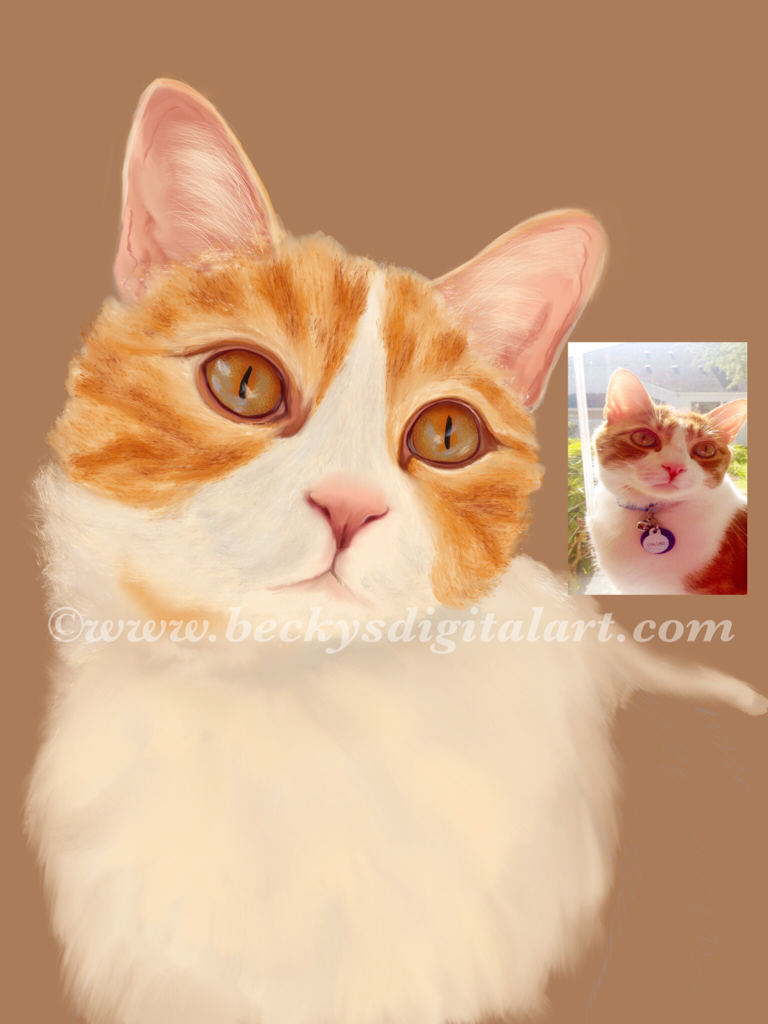
Work in Progress of Oscar
Painting of my cat Oscar
 So what is digital art really? According to wikipedia, Digital Art can be defined as any art that is made with the help of a computer. Drawings made on paper that are scanned in and changed in any way on the computer, photographs that are modified, 3D characters created using a computer are all examples of digital art. There are so many misunderstandings surrounding digital art, that in most circles, it isn’t even really taken seriously. This is a really sad situation. Most people think of photoshop filters when they think of digital art. They think of photo manipulation or that  someone puts a few photo color filters on and they are done. This isn’t true and even good photo manipulation can be an art form. There are many great artists on Fine Art America that use photo manipulation to a great end. They are usually photographers, but not always. 

     Then there is digital painting. Digital painting is basically painting using a stylus or mouse and creating the brush strokes on either a tablet or in the computer. There are even tablets to plug into the computer to make the painting process a little easier and more intuitive. Don’t get me wrong though, there is a learning curve when painting digitally, even when the artist may be an accomplished painter in traditional media.

Digital painting is an amazing art form and many effects can be achieved through it. Unlike in photo manipulation, digital painting starts out with a blank, digital canvas just as a traditional painter would. The digital artist builds up layers of color and digital paint to achieve the same thing any traditional painter would, a work of art. It may take less time to create, which is an argument of many traditional painters, but that is just because the digital painter doesn’t have any drying  or wait times. Most of my paintings take 10-15 hours to complete and sometimes more. I notice the better I get, the longer a painting takes. The following painting of "The Duel" took about 15 hours.


The Duel
 

 A digital artist and traditional artist are very similar. While an oil painter uses canvas and oil paints to make their art, a digital artist uses a digital canvas and pixels for paint to create theirs. Not one is better than the other, they are just different forms of art and each takes a unique set of knowledge and talent to achieve the end result, a work of art.

In closing, digital art is just the latest art form of the 21st century, it is stigmatized because it is new, just like watercolor was when it was new and colored pencils were 20 years ago. Even photography was stigmatized when the first cameras came out. 

Digital art is just art. The computer and the program are the tools, like brushes, pencils and paper,  but the artist is the one that uses those tools to create the masterpiece.

Example of fractal art


-Becky Herrera